
Nano Banana 2 on WeShop AI: From a First Image to a Clearer Creative Direction
Explore Nano Banana 2 with four edits: a travel portrait, paper robot, ceramic setting and winter landscape, with source images and exact prompts.
A first generated image can make an idea visible without settling what it should become. The palette might be right while the lighting feels wrong. A composition might work, but need a quieter atmosphere. Nano Banana 2 is interesting at this stage: a creator has something to respond to, but still needs to choose a direction.
Google identifies Nano Banana 2 as Gemini 3.1 Flash Image, with generation and editing positioned around rapid iteration. Its official announcement also describes text rendering, instruction following and subject consistency. Those capabilities give a creator ways to revise an idea; they do not establish that each revision will preserve everything requested.
At MOGU, we see that distinction across personal projects, illustration, spatial concepts and commercial design. WeShop AI, our consumer image and video creation product, is one way to explore these tasks. Our overview of WeShop's wider creative scope explains that broader context.
For this article, we made four independent source images and edited each through WeShop’s Nano Banana 2 route: a travel portrait, a robot illustration, a ceramic object and a seasonal landscape. Each example asks a different creative question. The actual inputs, outputs and editing prompts appear below; these are illustrative tasks, not a cross-model benchmark.

Editorial layout prepared for this article.
Four ways to move a creative idea forward
A weather edit asks what an image should feel like. A style edit asks how a character should be represented. A new setting tests whether an object remains recognizable; a season change tests whether a place can carry a different mood. These are distinct decisions, even when each begins with one source and one editing request.
For each task, write down the change and the features that must stay. Keep the source available so an attractive transformation can still be checked against its starting point.
Example 1 · A travel portrait in a different atmosphere

AI-generated source; one edit output per task, no rerolls or retouching.
The clear blue horizon becomes a misty coast while the yellow jacket, backpack, pose and smiling face remain recognizable. The image is more muted, but individual rain streaks and wet surfaces are less explicit than the prompt requests. This works as an atmosphere study; it does not establish exact preservation of every facial or background detail.
View source · View unretouched output
Settings: Nano Banana 2 · 1K · 4:3 · batch = 1. Image 1 is the source above.
Example 2 · A toy robot, reinterpreted as paper illustration
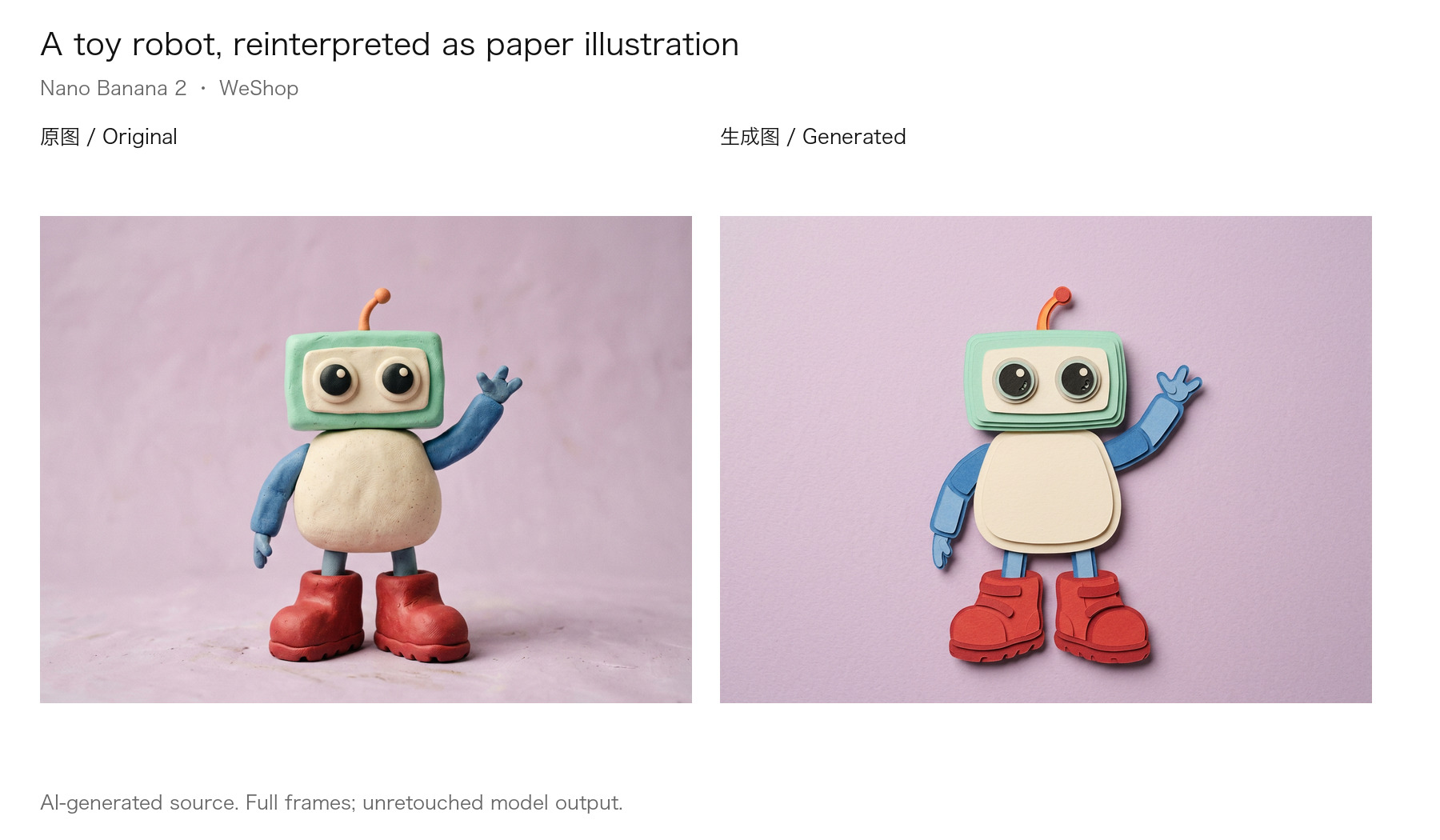
AI-generated source; one edit output per task, no rerolls or retouching.
The clay robot becomes a flat layered illustration, with paper-like edges and cast shadows. Its mint head, orange antenna, blue arms, red boots and raised hand remain readable. The eye rims and boot construction are reinterpreted along with the medium. Character continuity here means retaining identifying features, rather than matching every contour.
View source · View unretouched output
Settings: Nano Banana 2 · 1K · 4:3 · batch = 1. Image 1 is the source above.
Example 3 · A ceramic object in a new setting

AI-generated source; one edit output per task, no rerolls or retouching.
The mug moves from a neutral studio to a sunlit stone windowsill with a garden behind it. The blue glaze, curved handle and terracotta foot remain identifiable. Reflections and the apparent gloss change with the new light, so this is a presentation concept rather than a verified product color or material reference.
View source · View unretouched output
Settings: Nano Banana 2 · 1K · 4:3 · batch = 1. Image 1 is the source above.
Example 4 · A landscape across seasons

AI-generated source; one edit output per task, no rerolls or retouching.
Snow replaces the autumn colors while the curved pier, shoreline and distant ridge keep the scene recognizable. Dark open water still reflects the mountain. Vegetation and fine branches also change, and a separate thin band of shore ice is not easy to distinguish. A convincing season change is not a guarantee of geographic or botanical fidelity.
View source · View unretouched output
Settings: Nano Banana 2 · 1K · 4:3 · batch = 1. Image 1 is the source above.
Text, references and resolution still shape the choice
Nano Banana 2 also supports text-led images and reference-based work. A greeting card, illustrated journal cover or scene concept can combine visual treatment with wording. Keep the required copy separate so it can be checked letter by letter, rather than treating a plausible-looking heading as proof of accuracy.
Google's image-generation documentation describes model capabilities and output controls. A product or CLI may expose a different set of settings. In these examples we selected 1K, 4:3 and one output per request; they do not test every supported resolution or reference configuration.
For prepared task workflows, our WeShop AI tools guide explains how prompts and models become practical starting points. For this specific version, the Nano Banana 2 creation page provides the product entry point. For a title-led starting layout, explore the WeShop AI Poster Generator. If a chosen image needs more surrounding space, the AI Image Expander offers a separate outpainting workflow; inspect the new borders and composition before using the result.
Efficiency includes discarded directions and finishing work
Google positions Nano Banana 2 around Flash-speed generation. We have not run a controlled latency comparison here, so these examples do not establish a speed advantage over another model.
For a real project, count the requests needed to reach a useful direction, the outputs you discard, and the manual finishing that remains. A larger output can make sense after the composition is chosen; requesting the largest size for every exploratory branch can spend more resources before the creative question is settled.
The WeShop CLI estimated 30 Power per 1K request for these settings. That estimate is specific to these settings and this service, not a Google API price or a permanent tariff. Check the live settings and charge before generating. Four sources plus four edits were estimated at 240 Power; settled billing was not independently checked.
Where Nano Banana 2 fits in the family
Nano Banana 2 is a specific model choice, not a label for every newer Nano release. Our Nano Banana 2.1 article covers the later update; WeShop Solution's family comparison covers version specifications and selection. The Nano Banana family page provides a common starting point for its versions, while the WeShop model directory lets you explore other image and video families. Check the active model on each creation page.
The value explored here is narrower: using a known starting image and distinct editing branches to make a creative decision. These examples do not show that Nano Banana 2 beats a newer model, or that a generated landscape records a real winter visit. A photo-like scene is not evidence of a real event, and a finished-looking image is not an editable design master.
If you already have a useful source, write down one change and what must stay. Keep independent branches separate until you know which direction serves the work. The next image is valuable when it makes that choice clearer.