
Qwen Image 2.1: Making One Image the Starting Point for the Next
Explore Qwen Image 2.1 through generation, transparency, reference images, editing control and practical before-and-after Qwen examples.
Generating an image is often only the beginning. A character needs a different expression, a background needs replacing, or an element you like needs a place in another composition. The difficult part is carrying an idea through those changes without starting over with every result.
Qwen Image 2.1 is worth examining because it brings generation and subsequent editing into one model. According to the official Qwen documentation, it supports text-to-image generation, reference-based editing, native transparent images, and creation with up to ten reference images.
At MOGU, we are interested in how those capabilities connect into a creative process: continuing a character you like, giving an existing photograph a new expression, or turning separate references into a coherent scene. This follows the broader shift we discuss in WeShop AI in 2026: Image and Video Creation Beyond Ecommerce. A creative task can begin with a personal photo, an illustration, or a poster.
The capability analysis in this article draws on Qwen's official materials. The three illustrated edits were made through online Qwen in WeShop; their source images were also AI-generated. They illustrate specific editing tasks and are not version-specific tests of Qwen Image 2.1.
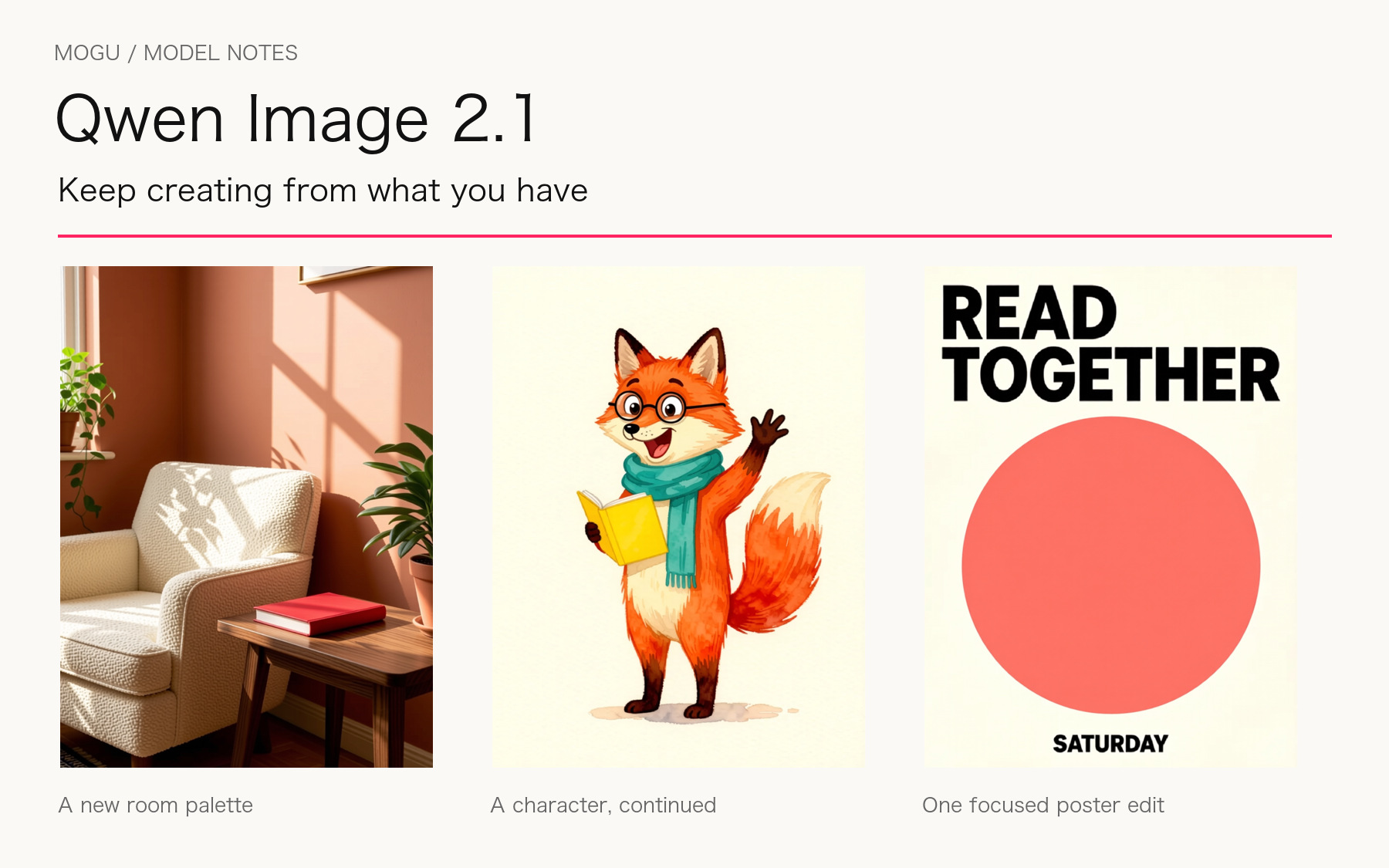
Editorial layout of the examples made for this article.
Generation and editing let a project continue from what already exists
Text-to-image generation turns a description into possible starting points. Once someone likes a result, the next request is usually more specific: keep the person and composition but change the lighting; preserve a room's geometry while changing its furnishings; or continue an illustrated character with a new expression and gesture.
These tasks ask a model to understand two things together: what should change and what should stay.
Qwen Image 2.1's generation and editing capabilities provide a foundation for this kind of continued creation. We think models in this category should be assessed across the first output and subsequent edits. An attractive first image can draw attention; maintaining the subject and intention through revisions is closer to everyday use.
That changes how a result should be inspected. A pleasing new background is only one consideration. Does the person still look like the same person? Has the viewpoint shifted? Has unwanted text appeared? Those details determine whether the image remains usable.
Example: A new room palette
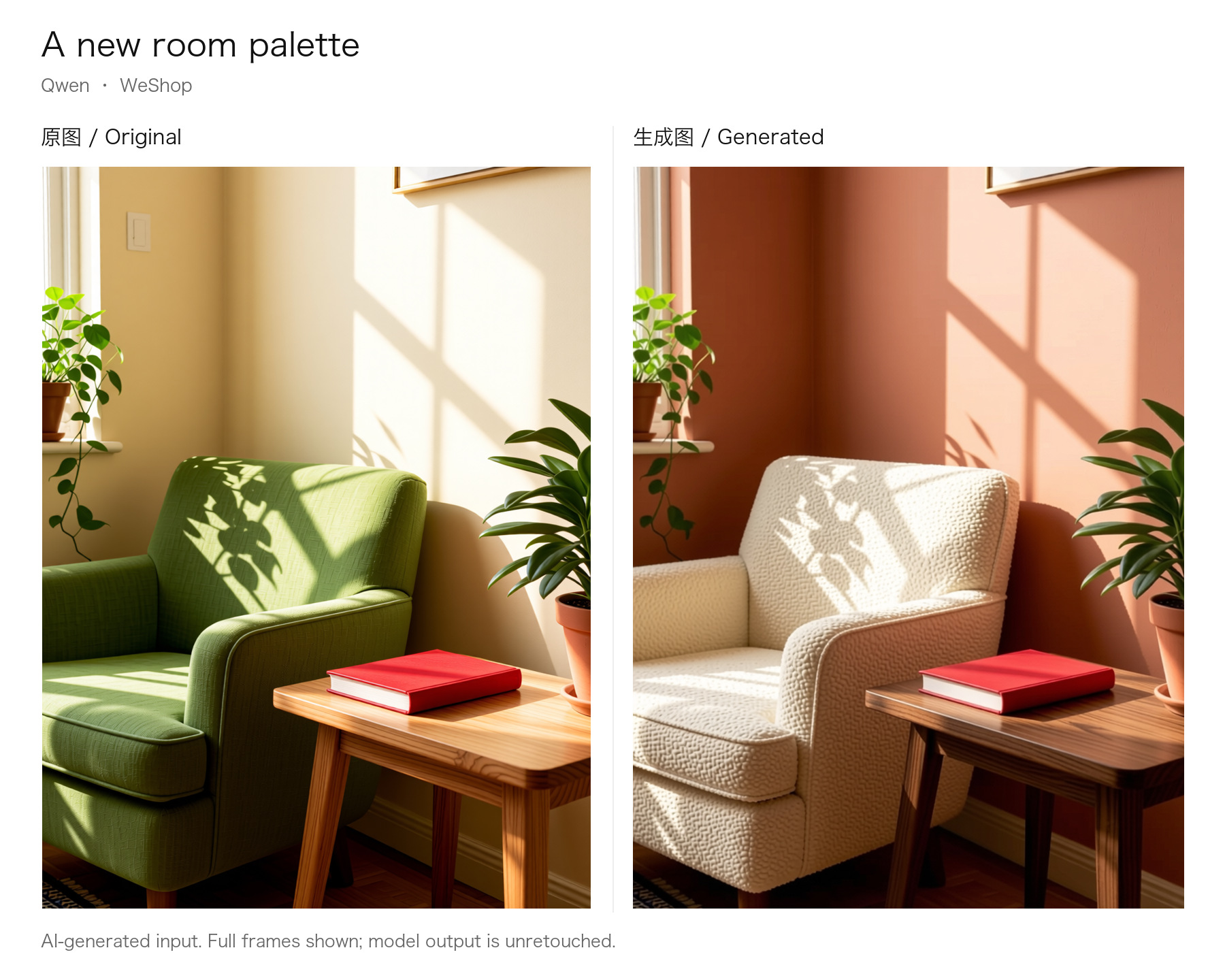
AI-generated source; edited with online Qwen in WeShop. One output per task, no rerolls or retouching.
The edit changes the wall to terracotta and the chair to cream fabric. The red book, side table, plants, and light direction remain recognizable. Upholstery texture and some edges also change, so preservation should be assessed against the task rather than assumed to be pixel-identical.
View source · View original output
Input: image 1 is the source above. Entry point: WeShop Qwen Image Edit; batch = 1, with other settings left at service defaults.
Example: A character, continued
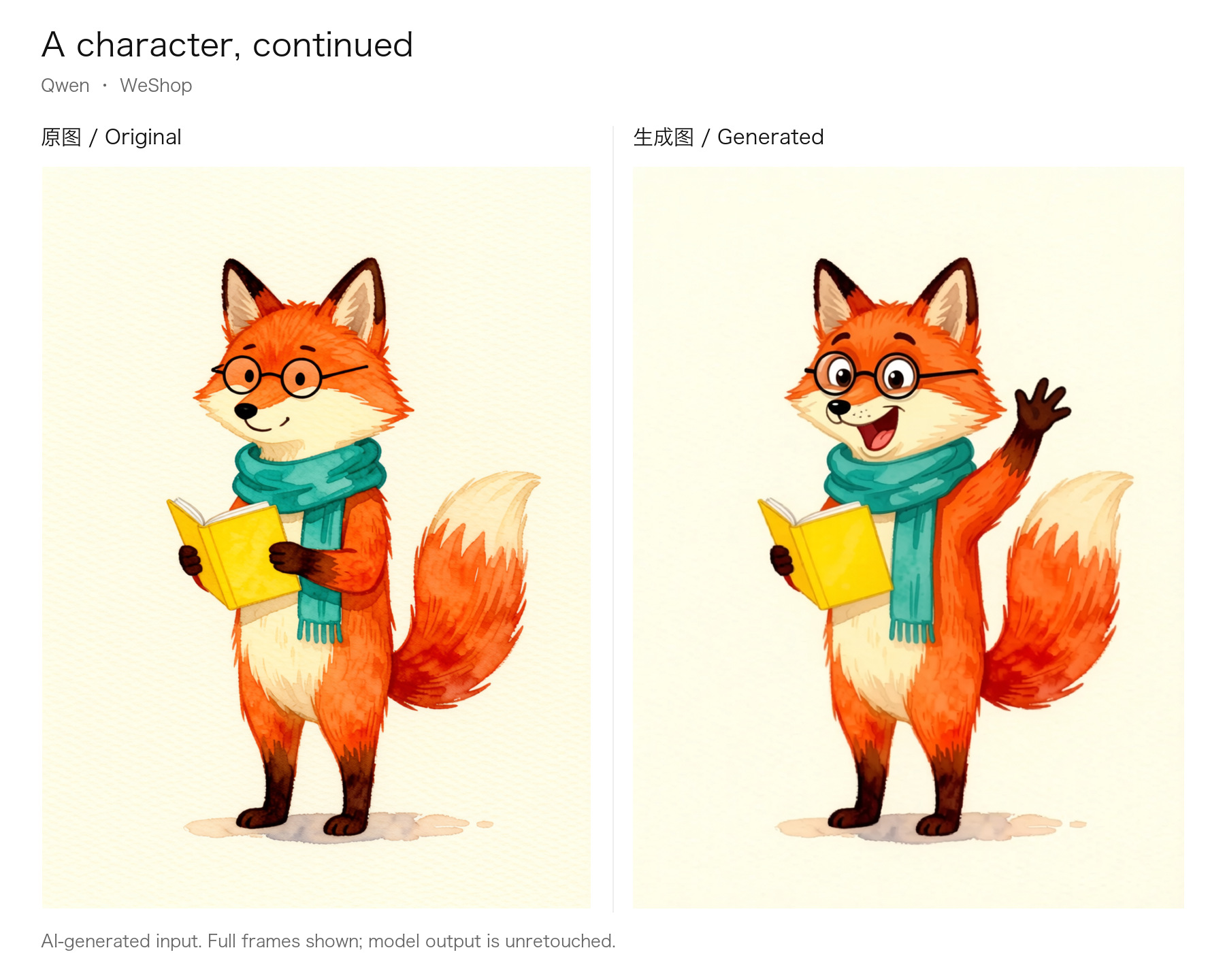
AI-generated source; edited with online Qwen in WeShop. One output per task, no rerolls or retouching.
The fox gains a surprised smile and a waving paw while retaining recognizable glasses, scarf, and yellow notebook. Its grip on the notebook changes with the arm position. Continuing a character requires checking both identifying features and the structure of the new pose.
View source · View original output
Input: image 1 is the source above. Entry point: WeShop Qwen Image Edit; batch = 1, with other settings left at service defaults.
Transparent images can become material for another composition
Consider a character intended for a sticker.
When the character and background are generated together, placing it on a greeting card or poster usually requires another step to deal with the background and edges. A character with an alpha channel can instead be placed into different compositions, leaving more room to adjust surrounding colors, text, and other elements.
Qwen Image 2.1's official materials describe transparent-image generation, editing of transparent assets, and subject extraction. These capabilities make an image useful as material for further layout and composition. See the official capability overview.
A transparent background does not, however, turn a picture into a fully editable design file. Clothing, facial features, and lettering do not automatically become separate layers.
We would inspect an asset on its intended backgrounds: are fine hairs clean, do translucent areas look natural, and do pale halos appear against a dark surface? For a reusable asset, those details matter more than a preview that simply appears to have no background.
Multiple references work best when each has a clear role
One reference might provide a person, another a setting, and a third a palette or atmosphere. Multiple references allow those sources of information to be supplied separately.
The possibilities extend across creative tasks. Separate portraits can inform a group-photo concept. Furniture references can help explore a room. A character sheet and a rough scene sketch can contribute to a story illustration.
More references also create more relationships to interpret. The model needs to know which image establishes identity, which contributes lighting, and which details must remain unchanged when a style is applied.
We therefore treat reference images as a creative brief with assigned roles. An input limit describes how many images can be supplied; it does not replace clear instructions. Before adding another reference, decide what information it contributes.
Inspect the result for mixed identities, implausible proportions, and conflicting light or perspective. Including every requested object does not necessarily make them a convincing whole.
A focused edit is useful when the surrounding image stays dependable
A poster may need a new date. A character may need a different hair color. A travel photo may need a distracting object removed. Small requests can reveal important limits in generative editing.
Qwen's public examples describe circles, painted annotations, and separate masks as ways to indicate an editing area. These give the model visual information about where a change belongs. See the official editing examples.
Evaluation should include both the edited area and its surroundings. Was the new color applied correctly? Is the lettering still clear? Have nearby textures or facial features changed? Asking for preservation and actually obtaining it are separate things to check.
That is why a useful demonstration should retain the source image, the generated result, and the exact editing prompt. The comparison lets readers see what was accomplished and what else changed along the way.
Example: One focused poster edit
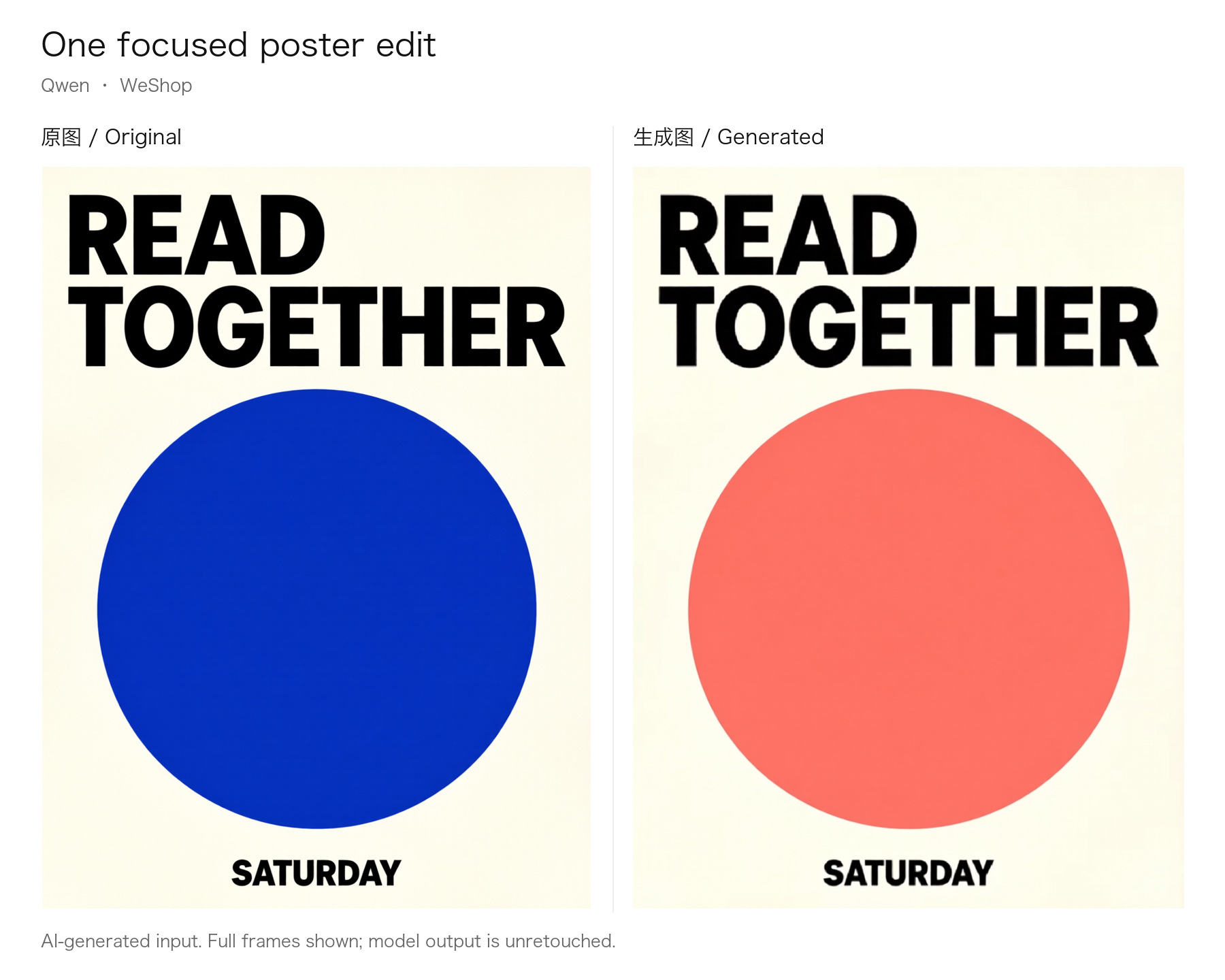
AI-generated source; edited with online Qwen in WeShop. One output per task, no rerolls or retouching.
The large circle changes from blue to coral pink. READ TOGETHER and SATURDAY remain readable, and the overall hierarchy survives. Letter edges and local spacing are not entirely unchanged. A poster requiring exact brand typography or print precision still needs checking against its source design.
View source · View original output
Input: image 1 is the source above. Entry point: WeShop Qwen Image Edit; batch = 1, with other settings left at service defaults.
Quality and efficiency depend on the creative task
A profile picture needs recognizable identity. A poster needs legible text and hierarchy. An interior concept needs plausible spatial relationships. An illustration may depend more on style and mood.
One attractive image cannot establish performance across all of those tasks. Start with what must be retained, then inspect detail, lettering, composition, and consistency through revisions.
Efficiency needs the same context. The 7B figure in the official description refers to the visual generation component, rather than the entire running system. Hardware, resolution, reference count, and inference settings also affect speed and resource requirements. See the official model card.
For an everyday creator, the practical questions are how long a usable result takes, how many revisions it needs, and how much manual finishing remains. Developers also need to consider deployment, memory, and maintenance. A single generation time does not capture those costs.
For readers who prefer to start with a specific task, our guide to WeShop AI tools explains how prepared instructions and models form a creative entry point. Understanding the underlying model provides another part of the selection process. For a message-led composition, the WeShop AI Poster Generator provides a task-specific starting point. To explore additional space around an existing picture, use the AI Image Expander and review the newly generated borders. These are separate tool workflows, with models and settings determined by their live pages.
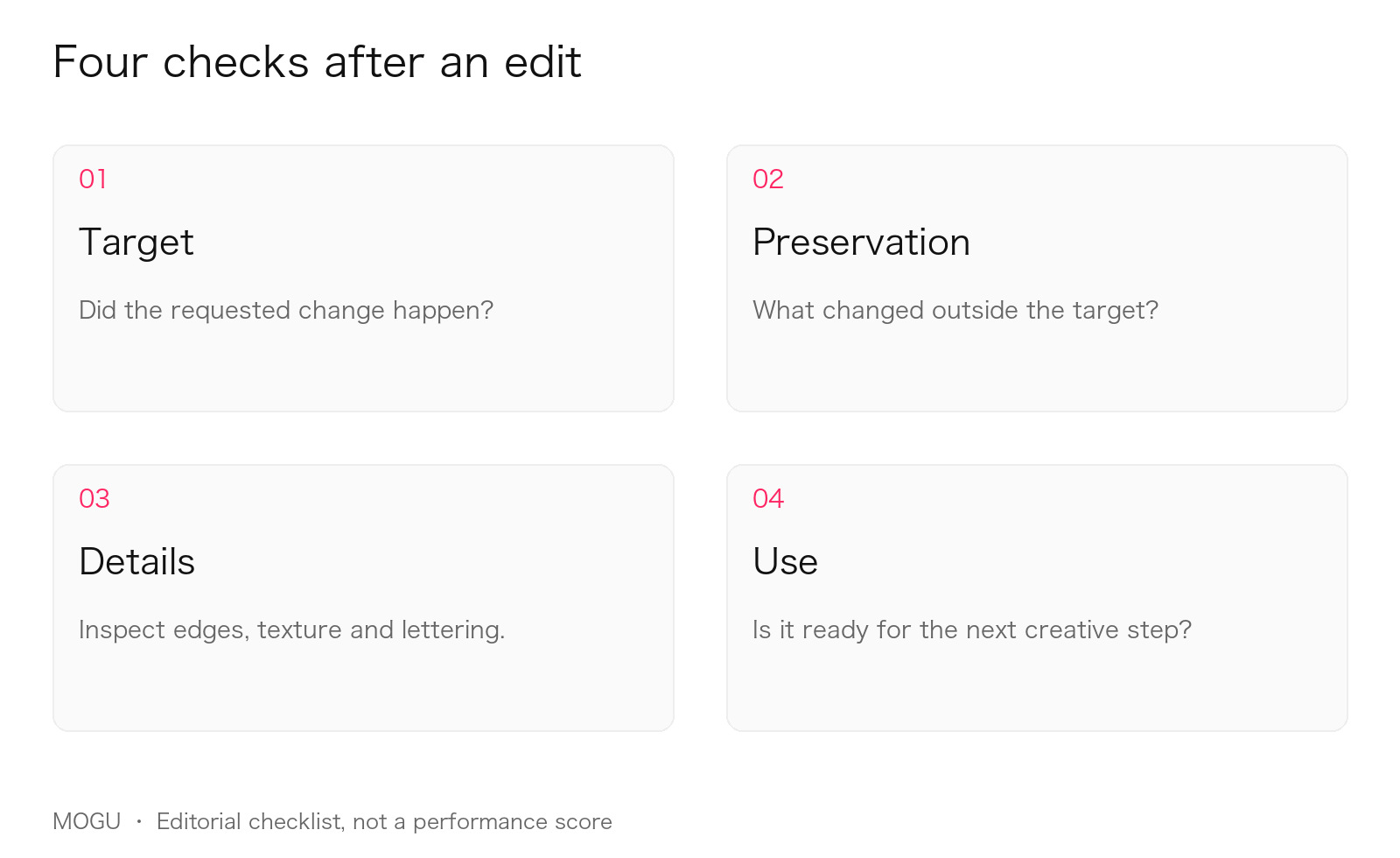
An editorial checklist, not a model performance score.
Public weights still come with specific usage conditions
Qwen Image 2.1 makes model materials publicly available, but access does not mean unrestricted use. At the time of review, those materials use the Qwen Research License, which requires a separate license for commercial use of the materials. Check the applicable conditions for research, evaluation, deployment, and commercial services in the official license.
When using an online product, also check the models, functions, and terms that product actually offers. A model's published capabilities do not establish which capabilities a particular online entry point has enabled.
For the product and group background, see WeShop AI and MOGU. WeShop AI, a consumer product within MOGU, offers an online Qwen image-editing entry point. An existing image and a clear editing instruction are a practical place to begin; available functions and settings depend on the live product. The WeShop model directory provides other model families, and the WeShop Help Center addresses common account, points and usage questions when planning a project.
How we see Qwen Image 2.1
Qwen Image 2.1 is interesting because it extends attention beyond the first generation, into selection, preservation, revision, and recombination.
Transparent assets can continue into design work. Multiple references can express a more complete idea. Local editing can make a change more specific. These directions can serve personal photography, illustration, spatial concepts, content creation, and commercial visuals, with different standards for each.
To judge whether it fits a project, begin with an image you already like. Request one clear change and write down what must remain. Compare the result beside the source: did the intended change happen, and is what you wanted to keep still there?
Whether one image can become the starting point for the next is ultimately a question that process must answer.
Further reading
For a closer look at the official capabilities and examples, WeShop Solution covers transparent output and multi-reference editing and Qwen Image 2.1's official editing examples. Those pages cover specific features; this article focuses on how an image can continue through a creative process.